
목록전체 글 (98)
울어라휘파람새야
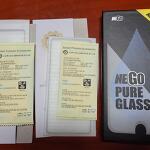 NEGO 강화필름 구매 후기
두 번째 구매한 네고코리아 강화유리. 내 핸드폰을 몇 번이나 구해줬다. 약간 비싼감은 있지만 가격만큼의 성능을 하기 때문에 재구매 결정. 내 핸드폰 2년만 안전하게 더 쓰고싶다.
DateSearch1.Date.ToString("MM")
Win7 테스트 서버에는 매일 새벽 이메일을 발송하는 스케줄이 있는데 어느날 부터 작동하지 않고 있었다. 원인을 찾기 위해 일단 로컬 MSSQL Server를 연결하려 했으나 실패알고보니 그 전날 윈도우 서버 비밀번호를 변경했고, 이것이 MSSQL Local Server 까지 영향을 준 것이다. 에러 메시지를 참고하여 아래의 위치를 수정해서 문제 해결 제어판 - 관리도구 - 서비스에서아래의 두 개의 로그인 계정을 바뀐 계정으로 수정한 뒤에 '시작' 을 시킨다. SQL ServerSQL (MSQSQLSERVER)Server Agent (에이전트)
나치가 공산주의자들을 덮쳤을 때, 나는 침묵했다.나는 공산주의자가 아니었다. 그들이 사회민주당원들을 가두었을 때, 나는 침묵했다.나는 사회민주당원이 아니었다. 그들이 노동 조합원들을 덮쳤을 때, 나는 아무 말도 하지 않았다.나는 노동 조합원이 아니었다. 그들이 유태인들에게 왔을 때, 나는 아무 말도 하지 않았다.나는 유태인이 아니었다. 그들이 나에게 닥쳤을 때, 나를 위해 말해 줄 이들이 아무도 남아 있지 않았다.
CKEditer 를 추가하고 submit 를 시키니 '잠재적 위험이 있는 request.form 값을 발견 했습니다' 라는 에러 메시지 발견. XSS 관련된 위험성을 자동으로 걸러내는 거 같은데. 자동을 수동으로 풀어버리면 된다고 함.. ------------------------------------------------------------------------------------------- 해당 파일 소스 지시문 상단, 붉은 부분 추가 [출처] 잠재적 위험이 있는 request.form 값을 발견 했습니다.|작성자 잠돌이 Web.Config, 붉은 소스 부분 추가 --------------------------------------------------------------------------..
* WebForm2.aspx--------------------------------------------------------------------------------------------------------- 값 입력 MD5 결과 SHA256 결과 MD5 -> SHA256 결과 ---------------------------------------------------------------------------------------------------------* WebForm2.aspx.cs---------------------------------------------------------------------------------------------------------using Syst..
 Windows Server 2003 SP2 / PowerShell 2.0 설치 문제(for Nuget install)
* 주의: 이 글은 문제의 원인도, 해결 방법도 정확한 것이 아닙니다. 비슷한 상황에 고생하실 분이 또 계실까봐 참고용으로 남깁니다. * 상황: Nuget 설치를 위해 Windows Server 2003 SP2 버전, PowerShell 1.0 이 깔린 상태에서 2.0 으로 업그레이드 * 버전에 맞는 파일 다운로드URL: http://support.microsoft.com/kb/968929FILE: WindowsServer2003-KB968930-x64-ENG.exe * 설치: 설치 실패, 에러 메시지 저장을 못했음. * 해결 방법: PowerShell 1.0 이 깔린 폴더 'C:\WINDOWS\system32\WindowsPowerShell\v1.0' 에서 WindowsPowerShell -> Wind..
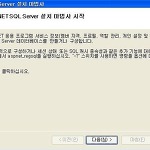 저장 프로시저 'dbo.aspnet_CheckSchemaVersion'을(를) 찾을 수 없습니다
asp.net 사용자 관리 DB 내에 있는 저장 프로시저 호출 오류.인터넷에서 구할 수 있는 샘플 예제들의 DB를 적용하다보면 로그인 관련된 페이지들이 이 DB를 사용한다. (원래 의도가 어떻든간에...) 아래의 경로에 가서 'aspnet_regsql.exe' 파일을 실행시켜 주면 설치 마법사가 실행된다. (버전 따라 폴더가 다름)C:\WINDOWS\Microsoft.NET\Framework\v4.0.30319계속 진행하다가 테이블, 저장 프로시저 등을 저장할 DB를 선택하면 끝.기존에 사용중이던 Table들이 있어도 상관없다.